Lessons learned: Migrating edge sites on VMware vSAN to Proxmox VE
In this post we'll discuss why, how, and some lessons learned from a project earlier this year migrating a set of edge locations from VMware vSAN to Proxmox VE.
This post is not meant as a comparison between vSAN and Proxmox, neither a recommendation on one or the other. Hopefully it can add some insights into a few things that are important to think about, as well as some of the differences that may (or not) affect operations.
Background
The edge sites in question was all running VMware vSAN in one of two ways. Most of them were running a two node setup with a witness host, wheras a few were running a three or four node "full" vSAN setup.
Since Broadcom bought VMware they have unleashed a steady stream of changes, especially around licensing. For one of our customers, running a large number of edge sites, this became the trigger to seriously evaluate alternatives. Cost was obviously a part of it, but the lack of trust in Broadcom as a vendor was gone for this customer hence they wanted out.
Before we head into why Proxmox was a fit for this customer, let's start with the demands we needed to meet and the capabilities we needed to deliver.
First off, we as a service provider are running the infrastructure and the virtualization layer up to and including the OS. In many ways our customers doesn't really care what we run for virtualization as long as it can deliver a stable platform where we can host virtual machines.
The edge platforms at this customer run a small number of virtual machines responsible for collecting and processing metrics from OT systems. These workloads are business-critical and must be available during operating hours. In addition, the setup needs to support failover to a secondary host in the event of hardware failure.
We also need to deliver local backup capabilities, e.g. store a set of local copies of backup data, since the connectivity to the sites can be unstable. For edge site backup we've standardized on Veeam Backup and Restore which we aimed to keep.
The unstable connectivity also puts a demand on the platform to be able to run without connection to our centralized data centers.
The existing hardware had to be used, meaning for most sites; two compute nodes and one node where the backup repository and witness services were running.
During our discussions we also learned that a short data loss, even during business hours, was tolerated. This was a critical point in our hunt for an alternative solution.
Another key in this was the time factor. We were very limited on time which also meant we were looking at replacing VMware with a more traditional virtualization provider and that could fit into our existing environment without too many customizations.
Finally we wanted support, however a 24/7 support wasn't strictly required when discussing with the customer.
Mapped capabailities
So mapping the needed features to capabilities we looked for a solution that could support:
- Automated failover from one host to another in case of HW failure
- Live migration (to support our operations and maintenance without requiring downtime)
- Supported by Veeam Backup and Restore
- Handle loss / connectivity issues to centralized DC
- Shared Storage and/or support for fast replication (mapped to the toleration of short data loss)
The solution
After a quick evaluation of options we really had two options. One was Hyper-v which we already had running in our central datacenters, and Proxmox. This was mostbly because of the Veeam integration.
The key difference between them was how they handled storage. What we looked at was two compute nodes that replicated data between them on a schedule. In Hyper-v one way of handling this was with functionality in Veeam, but the replication job was initiated from the central Veeam server which meant that there could be an issue if the site was offline for a while. Another issue was the replication interval which was once every hour. This would potentially leave us with one hour of data loss in case of failure on a host.
Proxmox however supports ZFS which has built-in replication features. The replication runs as a cron job which technically can run a migration every minute.
I've previously written a few blog posts on a Proxmox VE cluster setup with replication, witness components that supports clustering on two PVE nodes and so forth.
This functionality was good enough to support the customer demand and our operational demand.
- ✅ We have cluster functionality with automated failover in case of a host failure.
- ✅ Live migration is supported
- ✅ Veeam supports Proxmox
- ✅ Proxmox clusters can operate without connectivity to central DC (infact there's (or was) no centralized management)
- ✅ ZFS replication on a 5 minute interval is sufficient for storage
For the few sites with more nodes we are utilizing Proxmox with Ceph which I've written about in this blog post
Migration process
For migrating VMs from VMware to Proxmox there's a few options available. The official Proxmox documentation mentions a few, and I have a blog post on the topic. What we learned was however, that migrating from vSAN to Proxmox was not so easy. We didn't either have the time to evaluate third-party tools.
But since we already have Veeam in place, and we needed to have a last backup of the VMware VM anyway, we could utilize the Veeam functionality for restoring to a different hypervisor.
So what we in high level steps did was:
- Set vSAN FTT = 0
- Reinstall one host with Proxmox VE
- Since we had one working node + the witness component the vSAN workloads were still running
- Backup VM on vSAN ("last good")
- Remove VMware tools on VM
- New incremental backup on vSAN
- Initiate restore to Proxmox host
- Get VM up and running, fix network and OS storage, install QEMU guest agent
- Verify operation
- Restore rest of VMs to Proxmox
- Reinstall rest of hosts to Proxmox
- Verify cluster functionality
Obviously there's a lot of waiting, verifications, data copying and so forth, but this process is what we ran on all sites. Most of it was done manually, partly because of our lack of time in developing automations and partly because of different HW setups and connectivity capabilities.
Another quick mention is that when we reinstall the host running the backup functionality we lose the local backup. Before this we verified that the backups were replicated to our centralized backup repository and the customer was ok with not having local backup copies at this point.
Lessons learned
After migrating around 30 sites we have seen quite a few things that is important to consider. Although the setup is working and we can deliver mostly the same functionality as before we did encounter:
- No centralized management of Proxmox clusters (This is now delivered with the Proxmox Datacenter Manager)
- Lack of automation
- There's lots of possibilities here, but being a team very dependent on VMware PowerCLI, this was a challenge for us. Now we have lots of Ansible playbooks in place
- Monitoring and logging
- You might need to customize or set up new tools
- VM drivers and configuration after migration needs to be tested
- Performance
- ESXi and vSAN more efficient, especially on older hardware
Regarding performance we've seen a few things that's worth to give some more details to.
Some of the sites are running on older hardware (6+ years), and all vSAN clusters where hybrid flash.
We've seen some issues with the storage which we believe also have put more demand on CPU. And coupled with both the replication interval, and also with backups, this can put considerable load on the platform.
Additionaly some of the VMs had a sub-optimal configuration, e.g. everything installed on OS drive etc.
We have seen a ~10% additional CPU load overall on some of the clusters. For the sites with newer hardware the difference is lower.
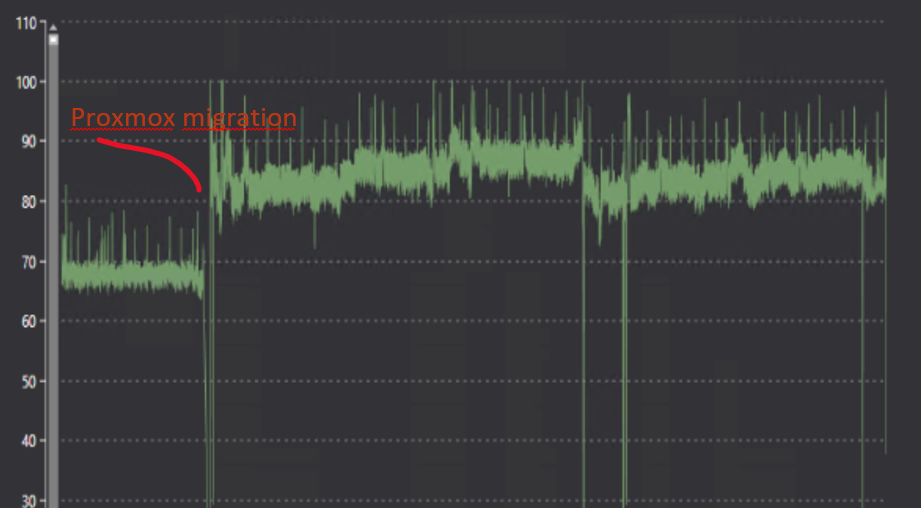
Some of the consequences for the worst sites has been that the virtual machines have stopped responding (since OS and data resided on the same disk), the host froze and couldn't display metrics, console etc, and the replication would never finish. This was resolved by killing replication and/or booting the virtual machine.
For these sites we have configured a slightly longer replication interval, we have rebuilt the Windows VM so that the OS disk is only an OS disk, and in some cases put the OS drives on the old SSDs cache devices instead of having them as cache devices for the ZFS pools since we've not seen a big enough performance gain of caching on ZFS pools
Summary
All in all the project we've run for this customer has been successful and Proxmox VE is a good enough solution for the use case. It's an easy migration from VMware from an operations point of view. The UI is intuitive enough, and there's automation capabilities, at least if you're into stuff like Ansible and/or shell scripts. There's also a REST API available that covers most of what's needed.
What we'd want to highlight is that before going for a replacement have a think about what it is that you actually need from the platform. What business problems are you solving?
Then think about what constraints you might have. It can be anything from the backup solution, security, support organization and what not.
After considering these things THEN you can start mapping out which (technical) solutions you can look at. Oftentimes I suspect it's actually here many people start. By looking at the different technical solutions and platforms that's available without really understanding what you're set to resolve.
Hopefully this blog post can shed some light on how we solved our migration project where we went from VMware vSAN to Proxmox on 30+ edge sites.
Lastly I want to give a huge shout out and mention to two of my colleagues, Geir Martin Bakken and Davis Klavins, which actually ran most of the actual migrations. Without them we'd never get this project done in time.
Feel free to reach out if you have any questions or comments